Convert FB2 (FictionBook) to EPUB Online Free
Convert DRM-free FB2 to an EPUB text edition with chapter order, basic formatting and supported covers. Inline illustrations are omitted; check footnotes and links.
Drop your FB2 files here
FB2 → EPUB · DRM-free
Local files stay in your browser during conversion.
Formatting may vary. Keep your original.
FB2 → EPUB
FictionBook 2 stores an ebook as structured XML. This converter reads chapter text, basic formatting, metadata and supported embedded covers. Inline illustrations are omitted with a notice.
EPUB packages text, styles and other resources for compatible reading apps. Amazon Send to Kindle accepts supported EPUB documents and converts them for delivery. USB sideloading is a different workflow.
Creates a text edition with chapter order and basic formatting. Embedded cover images may be retained; other illustrations, footnotes, fonts and complex layouts may change or be omitted.
How to convert FB2 to EPUB
Choose files
Select a DRM-free FB2 file and keep the original.
Convert
Start conversion. Processing time depends on your file and device.
Download
Check the EPUB text, navigation and layout in your reader.
Will this ebook work on my device?
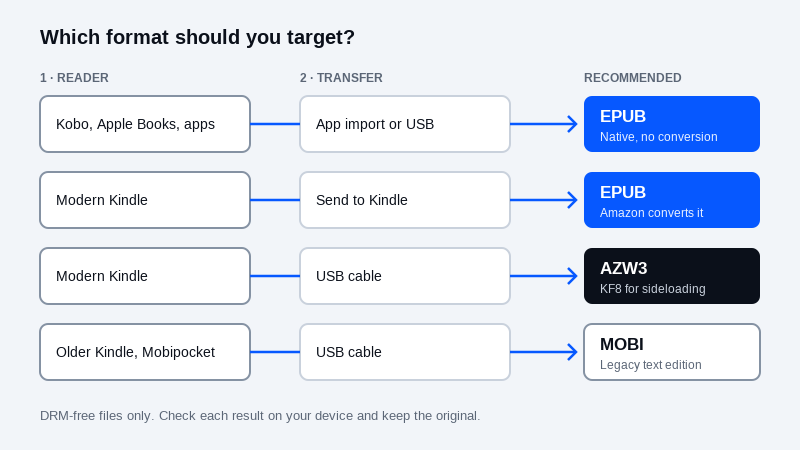
Pick your e-reader, the file you have and how you move books onto it. The advisor tells you whether to convert, which format to target and which converter to open.
Conversion Recommended for Best Layout Target: EPUB. Transfer: Send to Kindle (Email / Web / App).
Recommended format: EPUB
Send to Kindle accepts TXT and DOCX documents, but not FB2. Convert FB2 books to EPUB first; for plain TXT, an EPUB edition adds chapter navigation that a raw text file lacks.
- Choose the FB2 converter for .fb2 or the TXT converter for .txt; they are separate upload routes. DOCX is not supported here: export a DRM-free document as UTF-8 TXT first (complex formatting is lost), then use TXT → EPUB. TXT/DOCX can instead be uploaded directly with Send to Kindle.
TOC, encoding & font checklist
- Encoding: books are written as UTF-8. Check accents, curly quotes and non-Latin scripts in a middle chapter after conversion.
- Navigation: new EPUB files include an EPUB 3 nav.xhtml and an EPUB 2 toc.ncx built from the detected chapters. The source book's own contents page is not copied.
- Fonts and styling: conversion creates a text edition. Source CSS, embedded fonts and complex layouts are not preserved; your reader's font settings apply.
- DRM: only DRM-free files can be converted. Keep the original until the delivered copy passes your checks.
Check an EPUB’s packaging before you convert or send it
Scope: Basic OCF packaging preflight only — not official W3C EPUBCheck certification, DRM removal, or guaranteed Amazon Send-to-Kindle acceptance.
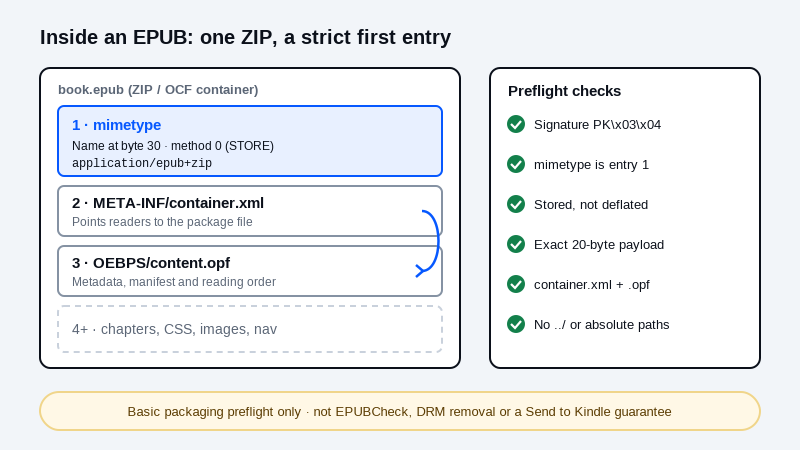
Readers reject an EPUB when its ZIP container is assembled in the wrong order. Try a sample package or check your own file — it is read locally in your browser and not uploaded.
Packaging looks correct Result for Valid EPUB 3 Package. Basic OCF packaging checks passed.
Result for Valid EPUB 3 Package
Basic OCF packaging checks passed. 1,253 bytes, 4 ZIP entries.
- Pass ZIP local file header signature (PK\x03\x04)
Starts with 50 4B 03 04 (ZIP local file header). - Pass First entry is “mimetype” at byte offset 30
“mimetype” is the first entry (name at byte 30, payload at byte 38). - Pass “mimetype” is stored uncompressed (method 0)
Compression method 0 (STORE). - Pass “mimetype” payload is exactly application/epub+zip
Exactly 20 ASCII bytes: application/epub+zip. - Pass META-INF/container.xml and an .opf package document exist
Found META-INF/container.xml and OEBPS/content.opf. - Pass No unsafe archive paths (../, absolute or drive paths)
4 entries with relative paths. - Pass No encryption or DRM markers
No META-INF/encryption.xml or encrypted ZIP entries.
Next step
Good to know
Is this conversion available?
Yes, for supported DRM-free files. Some variants, corrupt files or memory limits can prevent conversion.
Are local files uploaded?
Local file contents are processed in your browser. Importing a URL contacts its host. The website still makes ordinary asset and analytics requests.
Will the formatting stay the same?
Text extraction can lose covers, images, fonts and complex layouts. Inspect the output and keep your source file.
What if my file is encrypted?
The converter does not remove DRM. Use an unprotected file you have permission to convert.