Check an EPUB’s packaging before you convert or send it
Scope: Basic OCF packaging preflight only — not official W3C EPUBCheck certification, DRM removal, or guaranteed Amazon Send-to-Kindle acceptance.
Readers reject an EPUB when its ZIP container is assembled in the wrong order. Try a sample package or check your own file — it is read locally in your browser and not uploaded.
Packaging looks correct Result for Valid EPUB 3 Package. Basic OCF packaging checks passed.
Result for Valid EPUB 3 Package
Basic OCF packaging checks passed. 1,253 bytes, 4 ZIP entries.
- Pass ZIP local file header signature (PK\x03\x04)
Starts with 50 4B 03 04 (ZIP local file header). - Pass First entry is “mimetype” at byte offset 30
“mimetype” is the first entry (name at byte 30, payload at byte 38). - Pass “mimetype” is stored uncompressed (method 0)
Compression method 0 (STORE). - Pass “mimetype” payload is exactly application/epub+zip
Exactly 20 ASCII bytes: application/epub+zip. - Pass META-INF/container.xml and an .opf package document exist
Found META-INF/container.xml and OEBPS/content.opf. - Pass No unsafe archive paths (../, absolute or drive paths)
4 entries with relative paths. - Pass No encryption or DRM markers
No META-INF/encryption.xml or encrypted ZIP entries.
Next step
What the OCF preflight check inspects in your browser
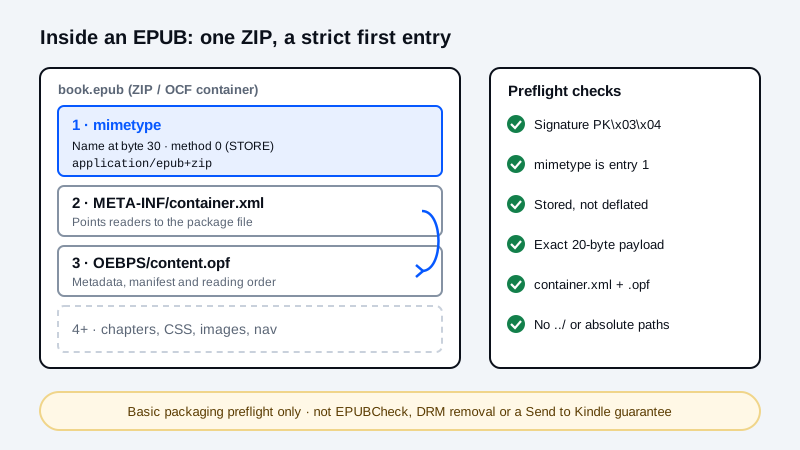
Every EPUB publication is packaged inside an Open Container Format (OCF) ZIP archive. Unlike an ordinary desktop ZIP file, the W3C EPUB 3.3 OCF specification requires the first entry in the archive to be an uncompressed 20-byte file named mimetype located at byte offset 30 with no local extra fields, followed by META-INF/container.xml pointing to your package document.
This client-side inspector reads the ZIP local headers and central directory directly in browser memory. Your ebook file is never uploaded to a server. It is a fast container preflight check before you upload to Amazon Send to Kindle or run the full W3C EPUBCheck validator locally.
| Check ID | Byte offset / ZIP structure | Required OCF value | Common failure cause |
|---|---|---|---|
| ZIP signature | Bytes 0..3 | 50 4B 03 04 (PK\x03\x04) | File is a MOBI, AZW3, RAR/CBR or PDF renamed to .epub. |
| First entry name | Bytes 30..37 (8 bytes) | mimetype with 0 extra-field bytes | Desktop Compress commands sort META-INF/ or a parent folder first, or attach OS timestamps. |
| Compression method | Bytes 8..9 of local header | Method 0 (STORE) | General ZIP utilities default to method 8 (DEFLATE). |
| Mimetype payload | Bytes 38..57 (20 bytes) | application/epub+zip (exact ASCII) | Text editors append a trailing \n, \r\n or UTF-8 BOM. |
| Container & OPF | META-INF/container.xml | Valid full-path pointing to an existing .opf entry | Case mismatch, missing META-INF/container.xml, or broken rootfile path. |
| Safe archive paths | All central-directory filenames | Relative POSIX paths without .. or \ | Windows backslashes or parent-directory traversal segments. |
How to repair a failed EPUB container
- Read our step-by-step EPUB Mimetype Error & Offset 30 STORE Repair Guide for exact command-line instructions.
- From inside the extracted book folder, write
mimetypefirst without compression or extra fields:zip -0 -X ../repaired.epub mimetype. - Append
META-INFand your content folder next:zip -r -9 -X ../repaired.epub META-INF OEBPS -x "*.DS_Store" "__MACOSX/*". - Drop
repaired.epubback into the inspector above to verify all six OCF checks pass, or use the Ebook Format Selector and MOBI to EPUB converter if you are starting from a legacy format.
Frequently asked questions
Does this EPUB preflight checker upload my book to a server?
No. The inspector reads local ZIP headers and central-directory entries in your browser using JavaScript. Your ebook stays on your device.
Is this preflight tool a replacement for W3C EPUBCheck?
No. This tool checks the six OCF ZIP container and rootfile packaging rules that commonly break when zipping an EPUB by hand. It does not validate every XHTML, CSS or OPF schema rule checked by local EPUBCheck.
Why does Send to Kindle reject an EPUB that opens in a desktop reader?
Many desktop reading apps tolerate a deflated or out-of-order mimetype entry, whereas strict validators and delivery pipelines check the OCF magic bytes at offset 30 and require a valid META-INF/container.xml rootfile pointer.
What should I do if the inspector says the file is not a ZIP container?
Check whether the file is actually a MOBI, AZW3, FB2, CBR (RAR) or PDF that was renamed with an .epub extension. Use the matching converter on MobiToEpub to create a real OCF EPUB container.
Related tools and guides
How to Fix the EPUB Mimetype Error · Ebook Format Selector · Fix EPUB TOC & Encoding · MOBI to EPUB Converter