Separate navigation problems from text-decoding problems
A book with readable chapters but an empty contents menu has a different problem from a book full of broken quotation marks. You may have both, but repairing one does not automatically repair the other. Keep the original MOBI or AZW3, save the first EPUB output separately, and record which reader shows the fault before editing anything.
Compare the beginning, a middle chapter and the ending in both source and output. If whole passages are absent, this may be an extraction failure rather than a table-of-contents problem. If the source already contains damaged text, conversion cannot reliably infer every missing character. Start from a better source when available.
| Symptom | First thing to inspect | Avoid this assumption |
|---|---|---|
| Contents menu empty, chapters readable | EPUB navigation document and package manifest | A visible contents page guarantees a reader menu |
| Contents link opens the wrong place | Relative path and fragment target | A label proves the destination exists |
| Chapters appear out of order | Package spine and chapter file sequence | Alphabetical filenames define the reading order |
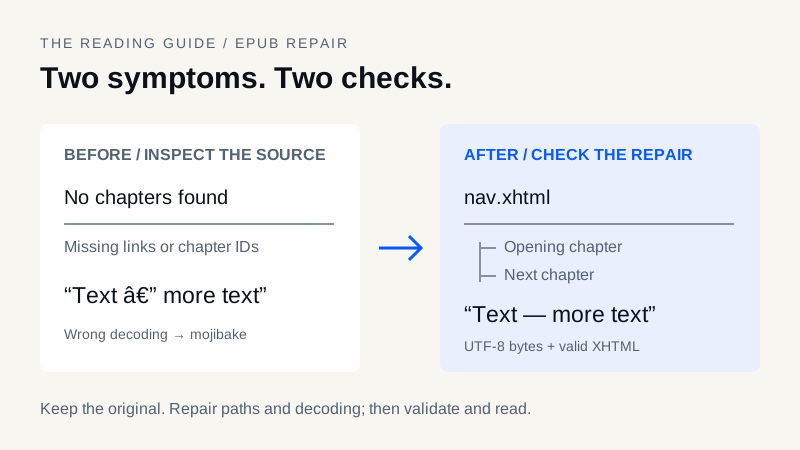
| Punctuation becomes — or ’ | Original bytes and the decoding used | Changing an encoding label repairs already damaged characters |
| Replacement character � appears | Whether original bytes are still recoverable | Every replacement can be reversed automatically |
What nav.xhtml, the spine and toc.ncx do
An EPUB 3 navigation document provides a nav element with epub:type="toc". Its links should point to actual content documents or valid heading IDs. The package manifest identifies the navigation document with properties="nav". The package spine defines the main reading sequence; it is not the same structure as a nested contents menu. See the W3C EPUB navigation specification.
Older EPUB 2 publications use NCX navigation. An EPUB 3 book can also include an NCX for compatibility, but copying an old NCX into a new archive without updating paths can leave broken links. Neither the NCX nor the navigation file recreates chapter text that the input parser failed to extract.
The MOBI to EPUB converter writes new navigation from the chapters it extracts, including a navigation document and an NCX compatibility file. That does not mean it preserves the original source contents tree. Its text-oriented parser may simplify a book's structure and omit resources. The same limitation matters when using AZW3 to EPUB.
Repair chapter structure in an EPUB editor
- Open a copy in an EPUB editor such as Calibre Edit book. Keep an untouched backup outside the working copy.
- Inspect the content documents and their reading order. Confirm that chapter text is present before rebuilding navigation.
- Give chapter openings meaningful headings. If linking to a heading, assign a unique ID and avoid reusing it in that same document.
- Use the editor's table-of-contents tools to create or repair entries. Include relevant front matter and chapters without inventing sections that do not exist.
- Check the manifest's navigation declaration and the spine order. If retaining an NCX for older readers, keep its destinations consistent too.
- Open every contents entry and verify that it lands at the intended place, including nested sections and the final chapter.
A minimal navigation fragment might look like this; it is an example, not a complete EPUB document:
<nav xmlns:epub="http://www.idpf.org/2007/ops" epub:type="toc">
  <h1>Contents</h1>
  <ol><li><a href="chapter_1.xhtml#opening">Opening chapter</a></li></ol>
</nav>
Here, the referenced XHTML file must exist relative to the navigation document, and it must contain an element with id="opening". Merely inserting this fragment does not fix a missing package declaration or absent chapter.
Diagnose CP1252 and UTF-8 mojibake
Mojibake happens when bytes are decoded with the wrong character encoding, sometimes followed by another save that preserves the error as real text. For example, an em dash encoded as UTF-8 can appear as — when those bytes are interpreted as Windows-1252. This is a clue, not proof that every non-English character has the same cause.
The site's supported MOBI-family parser reads the declared Windows-1252 or UTF-8 encoding and rejects unsupported declarations. A wrong declaration in the source or damage created before import can still produce bad text. A successful file download therefore does not certify correct decoding.
If you can access the original text bytes through an appropriate extraction or editing tool, decode them using the actual source encoding and save the corrected XHTML as UTF-8. Changing an XML declaration from Windows-1252 to UTF-8 without transcoding the bytes is not a conversion. If the only surviving copy contains replacement characters, the lost original characters may not be recoverable without another source.
Make small, reversible text corrections
Do not apply a global search-and-replace to every accented letter or curly quote. Legitimate multilingual text can contain the same characters as a corruption pattern. Try a narrowly scoped correction on a copy, compare it against the source, and inspect names, mathematical symbols, punctuation and chapter titles before expanding the change.
Also check display issues separately. Missing glyphs caused by an unavailable font are not necessarily an encoding failure. Test another reading app or a font that covers the language before rewriting otherwise valid text. Retain appropriate language metadata and do not strip diacritics just to make the page appear simpler.
Validate the package, then test the reader
Run EPUBCheck against the edited EPUB and resolve the reported structural errors. This website does not automatically run that validator. A clean result is useful but does not prove that the chapter labels are sensible, the text matches the source, or a particular reader displays everything well.
For Kindle delivery, inspect the local EPUB and then follow the Send to Kindle guide. Cloud processing introduces another reading check. For a complex book that loses resources during text conversion, the format comparison can help you decide whether to retain another edition instead.
Final repair checklist
- Original source and pre-edit EPUB are backed up.
- Chapter text is present and the spine order is correct.
- Every contents link and fragment opens the intended location.
- UTF-8 bytes, declarations and language metadata agree.
- Accents, quotes and symbols match representative source passages.
- Structural validation and an actual reading check are complete.
Treat a repair as successful only when the book is navigable and readable, not merely when an error message disappears.
Frequently asked questions
Why is my EPUB table of contents empty after MOBI conversion?
The output may lack usable navigation entries, or the parser may have extracted an incomplete chapter structure. Check the actual chapter text, navigation declaration and links before rebuilding the contents menu.
Does changing the XML declaration to UTF-8 fix mojibake?
No. The underlying bytes must be decoded and encoded correctly. Relabeling already corrupted text does not restore the original characters, especially when replacement characters have discarded information.
Do I need both nav.xhtml and toc.ncx?
EPUB 3 requires its navigation document; NCX is associated with EPUB 2 and may be included for compatibility. If both exist, keep their destinations consistent with actual content and spine order.
Does a passing EPUBCheck report guarantee correct Kindle reading?
No. EPUBCheck checks conformance, not every visual or semantic issue and not Amazon acceptance. Inspect the EPUB locally and the delivered copy on the intended reader.
Keep your original. Try a new format.
Check converter availability and use DRM-free files you have permission to convert.
Open the converter