EPUB package checks
Inspect common EPUB packaging issues and download supported repairs. This is a basic check, not EPUBCheck or Kindle certification.
Turn DRM-free MOBI books into EPUB, right in your browser.
Local files stay in your browser during conversion.
Formatting may vary. Keep your original.
Select your DRM-free MOBI files, or drag them into the converter.
Your files are processed in your browser, locally.
Save your EPUB files and check them in your reading app.
Local-file conversion happens in your browser, on your device.
Your selected books are not uploaded for conversion.
EPUB works with many ebook readers, apps and devices, giving you more freedom to read your books your way.
Read on Kobo, Apple Books, Google Play Books, and more.
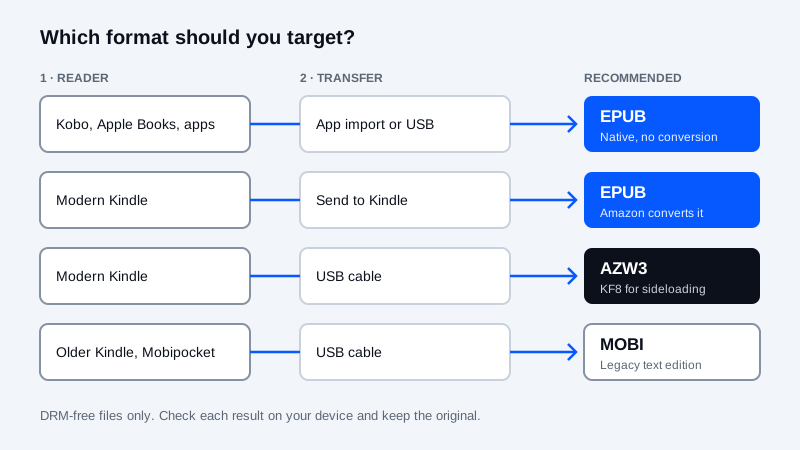
Amazon Send to Kindle accepts EPUB files and converts supported documents for your Kindle library.
Read the Send to Kindle EPUB guide →Pick your e-reader, the file you have and how you move books onto it. The advisor tells you whether to convert, which format to target and which converter to open.
Conversion Required — Format Blocked/Unsupported Target: EPUB. Transfer: Send to Kindle (Email / Web / App).
Amazon retired MOBI as a Send to Kindle upload format in late 2022 and asks for EPUB instead. Renaming .mobi to .epub does not rewrite the container; convert a DRM-free copy to EPUB, check it, then upload.
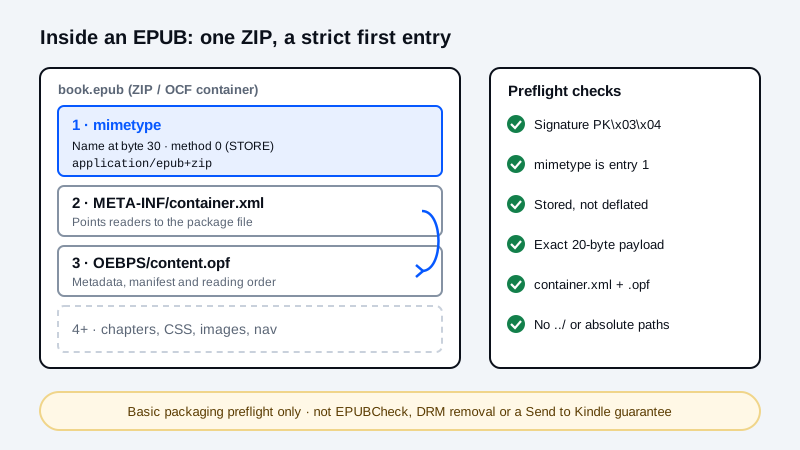
Scope: Basic OCF packaging preflight only — not official W3C EPUBCheck certification, DRM removal, or guaranteed Amazon Send-to-Kindle acceptance.
Readers reject an EPUB when its ZIP container is assembled in the wrong order. Try a sample package or check your own file — it is read locally in your browser and not uploaded.
Packaging looks correct Result for Valid EPUB 3 Package. Basic OCF packaging checks passed.
Basic OCF packaging checks passed. 1,253 bytes, 4 ZIP entries.
Convert DRM-free MOBI books to EPUB in your browser for Send to Kindle, Apple Books, Kobo, and PocketBook without uploading local files to a server.
| Workflow | Browser | Cloud | Desktop |
|---|---|---|---|
| Local processing | Yes | No | Usually |
| Installation | No | No | Yes |
| Advanced controls | Limited | Varies | Varies |
Our flagship mobi to epub converter extends the life of your older DRM-free library on modern devices as reading apps and cloud libraries continue to converge on open ebook formats. You can convert mobi to epub in your browser in seconds, whether you are transferring your books to Apple Books, Kobo, Google Play Books, or preparing them as files for Amazon Send to Kindle.
All unpacking of the mobi to epub process occurs on your local device, so there is no transfer of your reading collection to a remote server. The converter extracts readable chapter text and creates a new EPUB container with automatic chapter navigation. Always check your converted EPUB in your reader and keep your original MOBI file for backup since source MOBI files can vary widely in how they store covers, fonts, and complex formatting.
When you convert mobi to epub from a local file, every PalmDOC and MOBI record is unpacked directly inside your browser tab. Your ebook files are never uploaded to our servers.
Yes. Amazon Send to Kindle retired direct MOBI uploads and now accepts EPUB documents. Converting your unprotected MOBI to EPUB lets you submit the book through Send to Kindle or read it in Apple Books and Kobo.
Choose a DRM-free MOBI file, review the conversion options, then select Convert Now. Download the EPUB and check the text in your reading app before removing the original.
Files you choose from your device are processed locally in your browser. Conversion does not upload their contents to our server. Importing a book from a URL contacts the website hosting that file.
No. Encrypted books are not supported. Use a DRM-free copy you are allowed to convert; changing the filename does not remove encryption.
Results depend on the source book. This converter extracts text and builds an EPUB; complex layouts, illustrations, covers and fonts may not be preserved. Check the downloaded book and keep the original.
Use Amazon Send to Kindle to submit the EPUB. Amazon converts supported documents for your Kindle library. Copying an EPUB directly to a Kindle by USB is a different workflow and does not make it a native Kindle book.
Calibre is useful for managing a desktop ebook library and inspecting conversion settings. Try it when this browser converter cannot read your file, or when you need more control over the result.
Learn more about how MobiToEpub works.
URL imports contact the file's host. Sending a file to Kindle is a separate upload to Amazon.
MOBI is associated with older Kindle and Mobipocket books. EPUB packages text, styles and other resources for compatible reading apps. This converter extracts readable text and builds a new EPUB. Complex layouts, covers, illustrations and fonts may not be preserved.
| Reading workflow | MOBI | EPUB |
|---|---|---|
| Send to Kindle | Not accepted by the current service | Submitted for conversion by Amazon |
| Reading apps | Needs a compatible MOBI reader | Apple Books, Kobo and other EPUB readers |
| Formatting | Depends on the source variant | Result depends on the source and converter |
For more conversion controls or a large library, explore Calibre. Keep your original file.
More ways to prepare your books, using the tools already available on MobiToEpub. These additional tools currently use English.
Inspect common EPUB packaging issues and download supported repairs. This is a basic check, not EPUBCheck or Kindle certification.
Create a cover with your title, author and artwork. Download a JPEG, or apply it to the first unconverted book in your queue.
Open CBZ, ZIP or image files, create a fixed-layout comic and download an EPUB. CBR/RAR is not supported. Check the result in your reader.
Adjust grayscale, contrast and dithering in an image. Download a PNG, or use it as a queued book’s cover.
View a file’s header bytes, calculate its hash and export a report. A hash identifies bytes; it does not prove who created a file.
Enhance a scanned image and write your own transcription and research notes. Export Markdown or TEI XML; text recognition is manual.