Choosing between a browser tab and a full desktop ebook suite
Readers converting DRM-free ebooks usually fall into two very different workflows. Sometimes you have one or three .mobi or .azw3 books on an iPad, Chromebook, Android phone or work laptop where installing desktop software is inconvenient, and you simply need a valid reflowable .epub for Apple Books, Kobo or Amazon Send to Kindle. Other times you are curating a 600-volume personal archive that needs bulk metadata normalization, custom CSS stylesheet overrides or legacy HUFF/CDIC dictionary decompression.
Both local browser tools and desktop Calibre process files on your own hardware without sending book contents to a remote conversion queue, yet each shines in different scenarios.
| Workflow requirement | Local in-browser converter (MobiToEpub) | Desktop Calibre (ebook-convert) |
|---|---|---|
| Installation & OS support | Zero install; runs in modern mobile & desktop browsers | Full desktop application for Windows, macOS & Linux |
| Ideal batch size | 1 to a handful of DRM-free books on demand | Dozens or hundreds of books in a persistent library |
| Privacy model | Parses files in local browser memory; no server upload | Processes files on local disk |
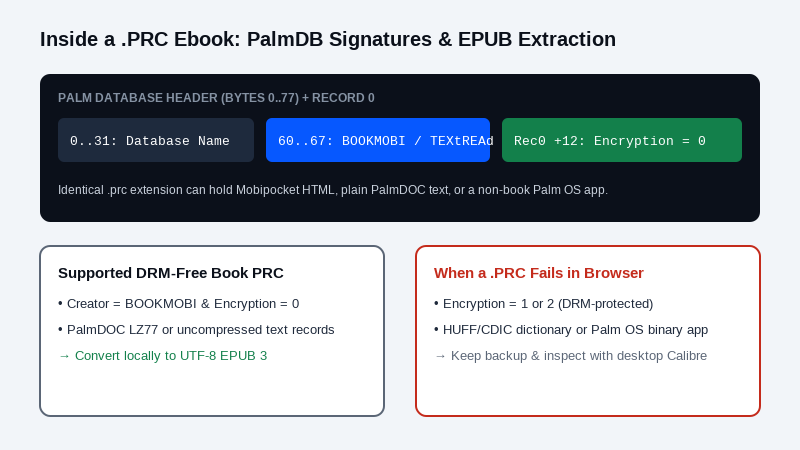
| Supported Mobipocket compression | Uncompressed (1) and standard PalmDOC LZ77 (2) | PalmDOC LZ77 plus legacy HUFF/CDIC (17480) |
| Typography & CSS fine-tuning | Clean reflowable text edition defaults | Granular look-and-feel rules, regex search & font subsetting |
| Direct USB device management | Download .epub / .azw3, then copy or cloud-send | Built-in USB device driver & library column sync |
How to convert quickly in your browser when you do not need desktop software
- Select the matching format route: Open the MOBI to EPUB converter for
.mobiand supported.prcinputs, or the AZW3 to EPUB converter for KF8 files. - Verify title and author metadata locally: Drop your DRM-free file into the browser workspace and review the extracted metadata before generating the output archive.
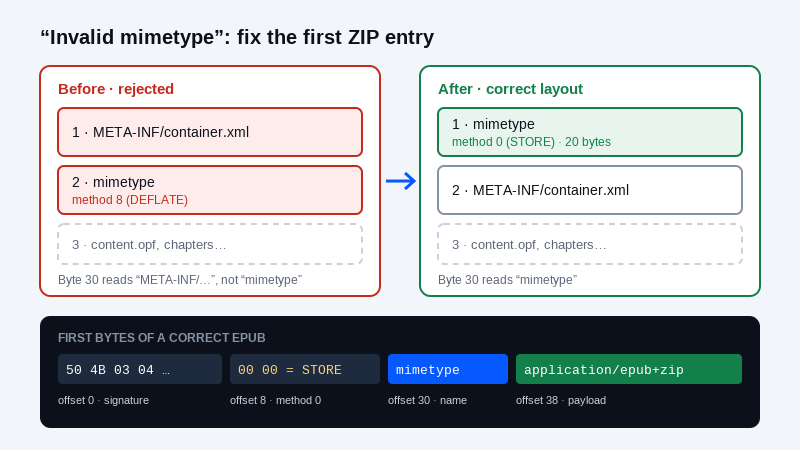
- Check OCF container packaging: Download the resulting
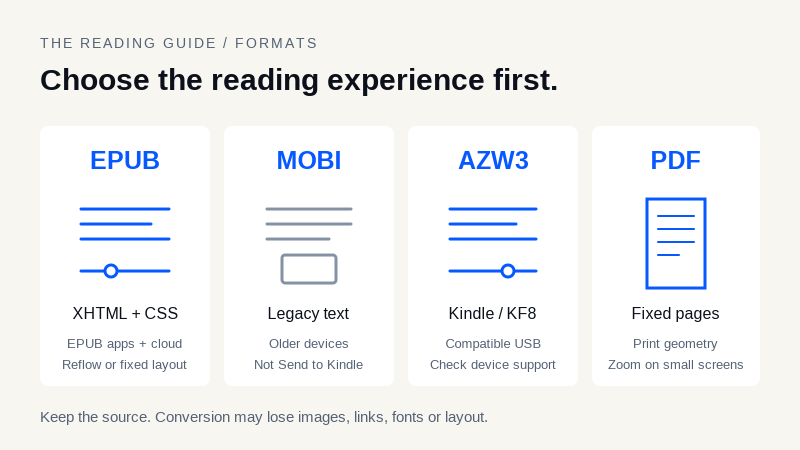
.epuband, if you plan to edit chapters or send through strict cloud validators, verify offset-30 packaging in the EPUB Preflight Checker per the W3C EPUB 3.3 OCF specification. - Match your target reader: Use the Ebook Format Selector to confirm whether your e-reader expects cloud EPUB, USB AZW3 or legacy MOBI.
When desktop Calibre is the better engineering choice
Because browser tabs run inside a memory-bounded JavaScript sandbox without raw filesystem drivers, certain archival tasks belong in a dedicated desktop tool:
- Legacy
HUFF/CDICreference dictionaries: Large 2000s encyclopedias and dictionaries compressed with Huffman codebooks (Compression = 17480) require desktop decoders—see our PRC & PalmDOC to EPUB guide. - Custom CSS look-and-feel transformations: When a publisher hard-coded awkward line heights, paragraph indents or embedded fonts that you want to strip or subset across 50 books at once, Calibre's conversion pipeline lets you apply repeatable stylesheet rules.
- Automated command-line scripting: Developers building reproducible publishing pipelines can invoke
ebook-convert input.mobi output.epubin shell scripts alongside localepubcheck.
Why mobile and tablet readers prefer local browser conversion
Calibre does not ship an official full conversion engine for iOS or iPadOS, and many campus or corporate laptops block third-party installers. Running a client-side parser inside Safari, Chrome or Firefox lets you turn a downloaded public-domain .mobi or .fb2 (FB2 to EPUB) into a clean EPUB directly inside the Files app workflow and open it immediately in Apple Books or Send to Kindle.
Combining both tools without losing chapter navigation or encoding
Regardless of which converter you choose, every conversion rebuilds internal HTML chapters and navigation manifests. If an older Mobipocket book displays garbled curly quotes or lacks a clickable chapter menu after conversion, consult our Missing Table of Contents and Character Encoding Repair Guide before deleting your source backup.
Decision checklist before you convert your next ebook
- Original DRM-free
.mobi,.azw3or.prcfile is backed up in a separate folder. - For quick 1–5 book conversion on phone, tablet or browser, use the local web converter.
- For 50+ book libraries, custom CSS overrides or
HUFF/CDICfiles, use desktop Calibre. - Converted EPUB opens cleanly at chapter 1, midpoint and final chapter on your target reader.
- Cloud uploads stay within Send to Kindle size limits and pass OCF container checks.
Frequently asked questions
Does converting in the browser upload my ebook to a remote server?
No. Local file conversion on MobiToEpub runs inside your browser tab using JavaScript; your ebook bytes are not uploaded to a conversion server. Standard static page asset and analytics requests are explained on our privacy page.
Why did a MOBI file convert in Calibre but fail in the browser converter?
The most common non-DRM cause is HUFF/CDIC dictionary compression (Record 0 compression code 17480) or malformed legacy HTML records that desktop Calibre repairs with heavier heuristics.
Can either Calibre or a browser converter remove DRM from store-bought Kindle books?
MobiToEpub is strictly for DRM-free books you have permission to convert and never removes DRM. Standard out-of-the-box Calibre also only converts DRM-free ebooks.
Does browser MOBI to EPUB conversion preserve every font and layout detail?
Text converters here generate clean reflowable text editions rather than pixel-exact replicas, so complex embedded fonts, multi-column tables or custom print styling may be simplified.
Keep your original. Try a new format.
Check converter availability and use DRM-free files you have permission to convert.
Open the converter